

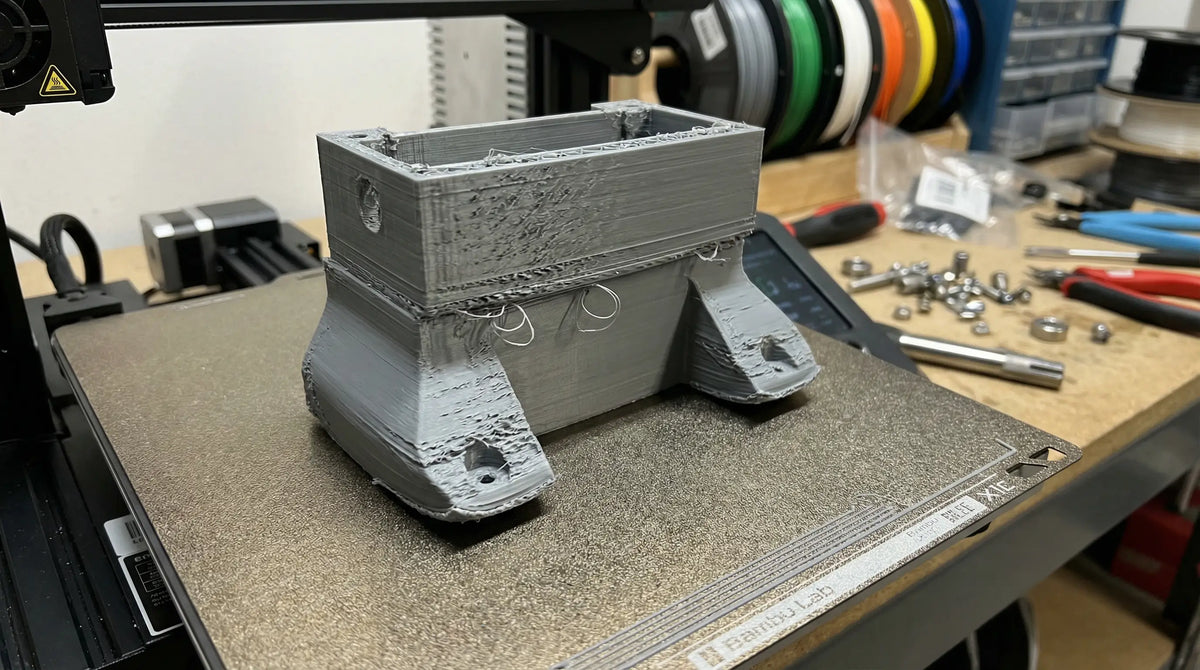
3D print errors: The 10 most common problems and their solutions
- Emne
- Best Practice & Tips
- Omfang
- 1756 ord · 9 min
- The 3 most common errors are poor bed adhesion, warping and stringing — all three can be fixed without buying a new printer.
- Most errors are caused by wrong temperature, wrong speed or missing calibration — not bad equipment.
- Material choice matters more than people think: PLA is forgiving, PETG needs tuning, ABS and PA6-CF need a controlled environment.
- Getting errors that won't go away? We'll print it for you — contact us and skip the tuning work.
Last updated: April 9, 2026 · Author: Henrik Beck, Maker Factory · 3D printing since 2013
Most 3D printing errors look like disasters in the printer, but are actually quite simple to fix once you know what to look for. I've worked with 3D printing since 2013 and made every single error you'll find in this guide — several times over. It's often the same 10 problems that keep coming back, whether you have a hobby printer for DKK 4,000 or an industrial printer for DKK 200,000.
Here are the 10 most common 3D printing problems, how to recognize them, and how to avoid 3D printing errors in the future. Just want the part printed without the tuning work? Read about our 3D printing service or send the file directly.
1. Poor bed adhesion
Symptom: The first layer lifts off the bed mid-print, or the print curls up at the corners. This is by far the most common error in 3D printing, regardless of printer or material.
Cause: The bed isn't clean, the temperature is wrong, or the first layer is printed too fast or too high above the bed. Fingerprints and dust are underrated culprits — skin oils make it impossible for the plastic to adhere properly.
Fix: Clean the bed with isopropyl alcohol before every print. Use the correct bed temperature (60°C for PLA, 70-80°C for PETG, 100-110°C for ABS). Slow down the first layer to 20 mm/s, and calibrate your Z-offset so the nozzle almost squeezes the plastic into the bed. The first layer should look slightly "squished," not round.
2. Warping
Symptom: Corners and edges lift off the bed during the print, and the part ends up warped or cracked.
Cause: 3D printing warping happens when the plastic cools unevenly — the outer layers contract before the inside does, and the stress pulls the part up off the bed. Worst in ABS, ASA and PA6-CF, milder in PETG and almost absent in PLA.
Fix: Use a heated bed, add a brim or raft to increase the contact area, and print in an enclosed chamber if possible. For ABS and PA6-CF, an enclosure is nearly a requirement. Avoid drafts in the workshop — an open door mid-print can cause warping on large parts by itself.
3. Stringing
Symptom: Thin plastic strands between parts of the print, like cobwebs between towers or across open geometries.
Cause: 3D printing stringing happens when the nozzle leaks plastic during "travel" moves across the print without actively extruding. Usually caused by the wrong retraction distance, too high a temperature, or damp filament. PETG is particularly sensitive.
Fix: Increase retraction distance (typically 4-6 mm for direct drive, 6-8 mm for Bowden), lower the print temperature by 5-10°C, and dry the filament in a filament dryer if it's been sitting out for a while. Damp PETG can produce significantly more stringing than fresh filament.

4. Under- and over-extrusion
Symptom: Under-extrusion shows up as gaps between layers, missing layers or weak prints. Over-extrusion shows up as lumpy surfaces, blobs and imprecise details.
Cause: Wrong flow rate, wrong filament diameter in the slicer, a blocked nozzle, or a mismatched combination of temperature and speed. Worn extruder gears are also a classic culprit.
Fix: Calibrate the extruder e-steps against a known reference length (mark 100 mm of filament and extrude 100 mm — measure what was actually used), measure your actual filament diameter with calipers, and run a flow-rate calibration. Good starting point: 100% flow ± 5%.
5. Layer delamination
Symptom: The layers split apart — either while the part is printing or when you pick it up and apply mechanical load.
Cause: Print temperature too low, cooling too fast, or print speed too high. The layers simply don't get time to fuse together properly.
Fix: Raise the temperature by 5-10°C, turn off or reduce the part-cooling fan for materials like ABS and PA6-CF, and lower the print speed. Layer delamination in PA6-CF almost always means the nozzle is too cold or the fan speed is too high — the material needs heat and calm.
6. Elephant's foot
Symptom: The bottom of the print is wider than the rest — the part "spreads" on the first few layers, and the dimensions at the bottom don't match the CAD file.
Cause: The bed is too hot, or the first layer is pressed too hard against the bed. The plastic flows sideways instead of staying where it should.
Fix: Lower the bed temperature by 5°C, calibrate the Z-offset so the first layer is precise (not squished), and enable "first layer compensation" in your slicer if available. On small precision parts, a cool glass plate can make the difference.
7. Z-wobble and visible layer shifts
Symptom: Side walls have waves, ribs, or offset layers that suddenly shift horizontally.
Cause: A bent Z leadscrew, loose belt tensioners, or mechanical vibration from the printer sitting on an unstable table. A single loose eccentric nut on the Y-axis can cause visible layer shifts all on its own.
Fix: Check the leadscrew for bending, tighten the belts (but not too hard — they should be as taut as a guitar string, no more), and place the printer on a stable, vibration-dampened surface. A small foam pad can solve more than people expect.
8. Support failures and overhang problems
Symptom: Overhanging geometry "droops" or collapses, and supports are either impossible to remove or leave ugly marks on the surface.
Cause: Support density too aggressive, wrong support distance, or geometry that exceeds a 45° overhang without support.
Fix: Use tree supports where possible, set support distance to 0.2-0.3 mm, and consider rotating the part to minimize overhangs. On SLA, supports are a craft of their own — read our SLA 3D printing guide for details.

9. Clogged nozzle
Symptom: The print stops extruding, or the filament "skips" back in the extruder with a characteristic clicking sound.
Cause: Burnt plastic in the nozzle, damp filament forming steam, or the wrong temperature for the material. A worn brass nozzle is a common cause with abrasive materials.
Fix: Run a cold pull (the heat-and-yank method), or replace the nozzle if it's old. If you're printing abrasive filament like PA6-CF or PETG-CF, use hardened steel — a brass nozzle can be worn out after just 50 hours with a carbon-fiber composite.
If you've spent hours chasing errors, it's often faster and cheaper to have us print the part for you. Send the file and get a quote — typically the same day.
10. Wrong slicer settings
Symptom: The print looks fine in preview but fails in practice — wrong size, missing detail, or print time that's 3x what was expected.
Cause: The slicer's default profile doesn't match the actual printer, material profiles aren't up to date, or the correct nozzle size wasn't reselected after a swap.
Fix: Use the manufacturer's official profile as a starting point, and only adjust what you understand. Most beginner 3D printing errors come from changing 5 settings at once and not knowing which one made the print better or worse. Read more about FFF/FDM technology on Wikipedia if you want to understand what the settings actually do.
A customer sent us a PETG part with heavy stringing after spending a whole weekend adjusting temperature. We asked how long the filament had been sitting open. The answer was "since January." We dried a spool in the filament dryer for 6 hours, ran the same print, and the stringing was gone. That's the kind of error I see every month — it's not the printer, it's the filament that's absorbed moisture. The single fix that's saved me the most hours over the years: make one change at a time, and print a test cube afterward.
FAQ — 3D printing errors
What is the most common 3D printing error?
Poor bed adhesion is by far the most common — it affects every material and every printer. The fix is usually a cleaner bed, correct Z-offset and a slower first-layer speed.
Can PLA warp?
Yes, but significantly less than ABS, ASA and PA6-CF. PLA has low thermal expansion and is the most forgiving material for beginners. If your PLA is warping, bed temperature or cleanliness is probably the problem.
Why am I getting stringing?
The 3 most common causes are print temperature too high, retraction distance too short, and damp filament. Check them in that order — damp filament is underrated and especially affects PETG and nylon.
What does under-extrusion mean?
Under-extrusion means the printer extrudes less plastic than the slicer expects. It causes gaps, missing layers and weak prints. Most often caused by the wrong flow rate, wrong filament diameter, or a partially clogged nozzle.
How do I adjust slicer settings correctly?
Start with the manufacturer's official profile. Make only one change at a time, and print a test cube or a benchy afterward to see the effect. Write down the changes so you can roll back if it got worse.
When is it better to have someone else print it for me?
When you've spent more time tuning than the job is worth. For functional parts in demanding materials (PA6-CF, PETG-CF, ABS), it's often faster and cheaper to send the file to a service like ours than to invest in an enclosure, a hardened nozzle and hours of troubleshooting.
Want to read more? See also What does 3D printing cost? and our guide to FDM vs. SLA.
Have a part you just can't get to work? Send the CAD file and get a quote the same day.
Get a quote →Mere fra Blog
 PC 3D printing — polycarbonate for heat and industrial parts
In short — PC (polycarbonate) 3D printing: PC is the strongest and most heat-resistant FDM material for technical parts —...
Læs artiklen →
PC 3D printing — polycarbonate for heat and industrial parts
In short — PC (polycarbonate) 3D printing: PC is the strongest and most heat-resistant FDM material for technical parts —...
Læs artiklen →
 3D printed jigs and fixtures — faster and cheaper than CNC
In short — 3D printed jigs and fixtures: 3D printed jigs and fixtures cost 5–20× less than CNC-machined aluminum and...
Læs artiklen →
3D printed jigs and fixtures — faster and cheaper than CNC
In short — 3D printed jigs and fixtures: 3D printed jigs and fixtures cost 5–20× less than CNC-machined aluminum and...
Læs artiklen →
 Nylon 3D printing — PA6-CF for industry and functional parts
In short — the key facts about nylon 3D printing: Nylon (polyamide) is the strongest FDM material for mechanically loaded...
Læs artiklen →
Nylon 3D printing — PA6-CF for industry and functional parts
In short — the key facts about nylon 3D printing: Nylon (polyamide) is the strongest FDM material for mechanically loaded...
Læs artiklen →